Here you will learn how to develop PHP login form using MySQL database. Have you ever wondered? what happens when you submit your credentials to any login form. You will understand the login application how it actually works in real time here. This PHP login application uses MySQL database to store user information and all the input parameters are validated with javascript. Comments have been added for easy understanding, especially to help newbies. You are always welcome with your doubts. If you are looking for the registration example, follow this link. The Complete Login and Registration Application using PHP can be found here.
This PHP login form using MySQL database connections contains PHP 7.0 methods only. Many methods like mysql_real_escape_string(), mysql_query(), mysql_num_rows(), mysql_connect(), mysql_select_db(), mysql_close() were deprecated in PHP 5 and removed from the latest version of PHP i.e. PHP 7.0. It uses prepared statements and
It uses prepared statements while querying in the database. Since the database contains the encrypted password we have decrypted the password using the method password_verify() while comparing it with the user password.
To execute PHP programs you would need a localhost server that supports PHP like wamp server or xampp server or any other. Most of them are available freely on the internet. You can click on the respective link and download them.
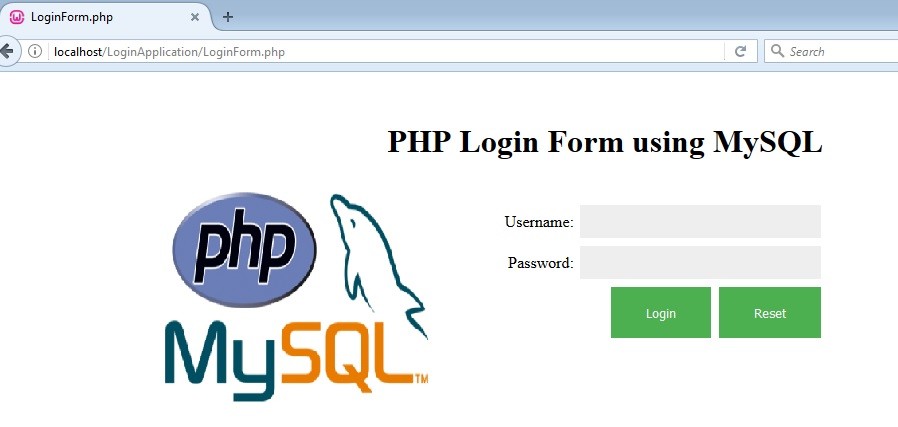
This is how the Login page looks on the browser (except PHP logo)
Recommended Programs:
LoginForm.php
<html>
<head>
<title>LoginForm.php</title>
<!-- Using external stylesheet to make the registration form look attractive -->
<link rel = "stylesheet" type = "text/css" href="Style.css"/>
<!-- Javascript validation for user inputs -->
<script type="text/javascript">
	function validate()
	{
	var username = document.login.username.value;
	var password = document.login.password.value;

	if (username==null || username=="")
	{
	  alert("Username can't be blank");
	  return false;
	}
	else if (password==null || password=="")
	{
	  alert("password can't be blank");
	  return false;
	}
	}
</script>
</head>
<body>

<!-- Make a note that the method type used is post, action page is Login.php and validate() function will get called on submit -->
<div style="text-align:center"><h1>PHP Login Form using MySQL</h1></div>
<br>
	<form name="login" method="post" action="Login.php" onsubmit="return validate();" >
	<div>Username: <input type="text" name="username" /> </div>
	<div>Password: <input type="password" name="password" /> </div>
	<div><input type="submit" value="Login"></input> <input type="reset" value="Reset"></input></div>
</form>
</body>
</html>
Style.css
/* Sample CSS - Modify it as per your taste */
	input[type=text], input[type=password] {
	background-color: #EEEEEE;
	border: none;
	color: black;
	width:auto;
	padding: 8px 52px;
	text-decoration: none;
	margin: 4px 2px;
	cursor: pointer;
}

input[type=button], input[type=submit], input[type=reset] {
	background-color: #4CAF50;
	border: none;
	color: white;
	padding: 16px 32px;
	text-decoration: none;
	margin: 4px 2px;
	cursor: pointer;
	}

body{
	text-align:right;
	margin: 50px 400px;
}
Once you click on the submit button of the LoginForm.php the request is forwarded to the URL given in the action=”” attribute of the form. In this case, it is forwarded to the Login.php
Login.php
<html>
<body>
<?php
 include_once("DBConnection.php");
 session_start(); //always start a session in the beginning
if ($_SERVER['REQUEST_METHOD'] == 'POST')
{
	if (empty($_POST['username']) || empty($_POST['password'])) //Validating inputs using PHP code
	{
		echo
		"Incorrect username or password"; //
		header("location: LoginForm.php");//You will be sent to Login.php for re-login
	}

	 $inUsername = $_POST["username"]; // as the method type in the form is "post" we are using $_POST otherwise it would be $_GET[]
	 $inPassword = $_POST["password"];
	 $stmt= $db->prepare("SELECT USERNAME, PASSWORD FROM PROFILE WHERE USERNAME = ?"); //Fetching all the records with input credentials
	 $stmt->bind_param("s", $inUsername); //bind_param() - Binds variables to a prepared statement as parameters. "s" indicates the type of the parameter.
	 $stmt->execute();
	 $stmt->bind_result($UsernameDB, $PasswordDB); // Binding i.e. mapping database results to new variables

	//Compare if the database has username and password entered by the user. Password has to be decrypted while comparing.
	 if ($stmt->fetch() && password_verify($inPassword, $PasswordDB))
	 {
		$_SESSION['username']=$inUsername; //Storing the username value in session variable so that it can be retrieved on other pages
		header("location: UserProfile.php"); // user will be taken to profile page
	 }
	 else
	 {
		   echo "Incorrect username or password";
		  ?>
		  <a href="LoginForm.php">Login</a>
       <?php
	 }
}
       ?>
</body>
</html>
DBConnection.php
This code is used to establish a connection with the MySQL database server.
As a best practice maintain database connections in a separate file so that any changes to the database server can be done quickly.
<?php
	define('DB_SERVER', 'localhost:3306'); //database server url and port
	define('DB_USERNAME', 'root');  //database server username
	define('DB_PASSWORD', 'root123'); //database server password
	define('DB_DATABASE', 'profile'); //where profile is the database

	$db = mysqli_connect(DB_SERVER,DB_USERNAME,DB_PASSWORD,DB_DATABASE);
?>

UserProfile.php
<html>
<title>userProfile.php</title>
<body>
 <?php
	 session_start();
	 $username = $_SESSION['username']; //retrieve the session variable
 ?>

 <div style="text-align:center"><h1>User Profile</h1></div>
 <br/>

 <div style="font-weight:bold"> Welcome <?php echo $username ?> </div>

 <div style="text-align: right"><a href="Logout.php">Logout</a></div> <!-- calling Logout.php to destroy the session -->

 <?php
 if(!isset($_SESSION['username'])) //If user is not logged in then he cannot access the profile page
 {
	 //echo 'You are not logged in. <a href="login.php">Click here</a> to log in.';
	 header("location:LoginForm.php");
 }
 ?>
</body>
</html>
Logout.php
<?php

 session_start();
 $username = $_SESSION['username']; //retrieve the session variable

 unset($_SESSION['username']); //to remove session variable
 session_destroy(); //destroy the session
 header("location: LoginForm.php"); //to redirect back to "Login.php" after logging out
 exit();

 if(!isset($_SESSION['username'])) //If user is not logged in then he cannot access the profile page
 {
 //echo 'You are not logged in. <a href="login.php">Click here</a> to log in.';
 header("location:LoginForm.php");
 }
?>
Its still show me the incorrect password although i registered it to RegisterForm.php Can you help me?
Hi Calvin,
It should work well actually. Can you check the data present in your database whether it is in an encrypted format?
https://krazytech.com/programs/complete-login-and-registration-application-using-php-and-mysql
Warning: mysqli_connect(): (HY000/1049): Unknown database ‘profiles’ in C:\xampp\htdocs\test-db-connection\DBConnection.php on line 10
Fatal error: Uncaught Error: Call to a member function prepare() on boolean in C:\xampp\htdocs\test-db-connection\Login.php:21 Stack trace: #0 {main} thrown in C:\xampp\htdocs\test-db-connection\Login.php on line 21
Hi,
First thing is to verify your DB Name and credentials, next, the field names that you have given in the input form. If you correct these things, it should work for you.
hello sir i did everything but it keeps showing me incorrect password or username and it in my database all okk
Hi,
In order to log in, the user details must be present in the database table first. You can use the following sign-up application to insert user details into the database.
https://krazytech.com/programs/php-mysql-registration-form
hello,
i did the registration form in registered successful it also showed in my database but it still shows incorrect or password
Hi,
It is case sensitive. Do verify it.
Add another user and try logging in with the same. It is a tested application. It should work properly.
hello sir
i honestly did that also is there a way i can send it to you so you can check ?
Comments are closed.