This Java login application follows MVC architecture and consists of Java servlets, and JSPs. It uses the MySQL database server to refer to the user details. The input fields are validated using javascript.
What is a Model View Controller architecture?
The model (DAO) consists of application data and business rules, and the controller (Servlet) acts as an interface between views and the model. It mediates input, converting it to commands for the model or view. A view (JSP) can be any output representation of data, such as a chart or a diagram, generally HTML or JSP page.
Here DAO is the Data Access Object – This part concentrates on business logic and database server connections and operations.
Use any IDE – Integrated development environment to minimize your work. If you haven’t started using any IDE, go get one. You will fall in love with it. I would recommend you use Eclipse for Java applications. Link to download Eclipse. It is an open-source tool.
This application is explained thoroughly with appropriate comments and tested in Eclipse IDE. Please write comments if you find any difficulty while understanding the application.
Suggested Read:
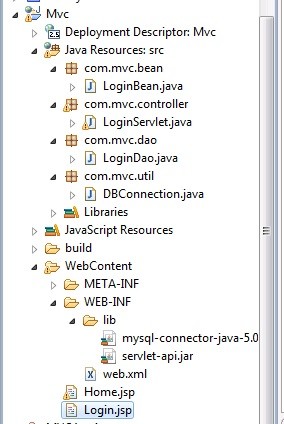
It is advised to segregate different components in a standard directory structure as shown below. Start your programming with New Project -> dynamic web application project type.
Subscribe to our channel
Login details are forwarded to LoginServlet from the Login.jsp page. When you click on the Login button the request is forwarded to the page which is mentioned in the action tag of the form so here the request will be forwarded to LoginServlet.java class.
Login.jsp
<%@ page language="java" contentType="text/html; charset=ISO-8859-1"
 pageEncoding="ISO-8859-1"%>
<!DOCTYPE html PUBLIC "-//W3C//DTD HTML 4.01 Transitional//EN" "http://www.w3.org/TR/html4/loose.dtd">
<html>
<head>
<meta http-equiv="Content-Type" content="text/html; charset=ISO-8859-1">
<title>Login</title>
<script>
function validate()
{
	 var username = document.form.username.value;
	 var password = document.form.password.value;

	 if (username==null || username=="")
	 {
	 alert("Username cannot be blank");
	 return false;
	 }
	 else if(password==null || password=="")
	 {
	 alert("Password cannot be blank");
	 return false;
	 }
}
</script>
</head>
<body>
	<div style="text-align:center"><h1>Login application in Java using MVC and MySQL </h1> </div>
	<br>
	<form name="form" action="LoginServlet" method="post" onsubmit="return validate()">
		<!-- Do not use table to format fields. As a good practice use CSS -->
		<table align="center">
		 <tr>
		 <td>Username</td>
		 <td><input type="text" name="username" /></td>
		 </tr>
		 <tr>
		 <td>Password</td>
		 <td><input type="password" name="password" /></td>
		 </tr>
		 <tr> <!-- refer to the video to understand request.getAttribute() -->
		 <td><span style="color:red"><%=(request.getAttribute("errMessage") == null) ? ""
		 : request.getAttribute("errMessage")%></span></td>
		 </tr>
		 <tr>
		 <td></td>
		 <td><input type="submit" value="Login"></input><input
		 type="reset" value="Reset"></input></td>
		 </tr>
		</table>
	</form>
</body>
</html>
LoginServlet.java
package com.mvc.controller;

import java.io.IOException;
import javax.servlet.ServletException;
import javax.servlet.http.HttpServlet;
import javax.servlet.http.HttpServletRequest;
import javax.servlet.http.HttpServletResponse;

import com.mvc.bean.LoginBean;
import com.mvc.dao.LoginDao;

public class LoginServlet extends HttpServlet {

	public LoginServlet() // default constructor
	{
	}

	protected void doPost(HttpServletRequest request, HttpServletResponse response) throws ServletException, IOException {

		//Here username and password are the names which I have given in the input box in Login.jsp page. Here I am retrieving the values entered by the user and keeping in instance variables for further use.

		String userName = request.getParameter("username");
		String password = request.getParameter("password");

		LoginBean loginBean = new LoginBean(); //creating object for LoginBean class, which is a normal java class, contains just setters and getters. Bean classes are efficiently used in java to access user information wherever required in the application.

		loginBean.setUserName(userName); //setting the username and password through the loginBean object then only you can get it in future.
		 loginBean.setPassword(password);

		LoginDao loginDao = new LoginDao(); //creating object for LoginDao. This class contains main logic of the application.

		String userValidate = loginDao.authenticateUser(loginBean); //Calling authenticateUser function

		if(userValidate.equals("SUCCESS")) //If function returns success string then user will be rooted to Home page
		 {
			 request.setAttribute("userName", userName); //with setAttribute() you can define a "key" and value pair so that you can get it in future using getAttribute("key")
			 request.getRequestDispatcher("/Home.jsp").forward(request, response);//RequestDispatcher is used to send the control to the invoked page.
		 }
		 else
		 {
			 request.setAttribute("errMessage", userValidate); //If authenticateUser() function returnsother than SUCCESS string it will be sent to Login page again. Here the error message returned from function has been stored in a errMessage key.
			 request.getRequestDispatcher("/Login.jsp").forward(request, response);//forwarding the request
		 }
    }
}
LoginDao.java
package com.mvc.dao;

import java.sql.Connection;
import java.sql.ResultSet;
import java.sql.SQLException;
import java.sql.Statement;
import com.mvc.bean.LoginBean;
import com.mvc.util.DBConnection;

public class LoginDao {
	 public String authenticateUser(LoginBean loginBean)
	 {
		 String userName = loginBean.getUserName(); //Assign user entered values to temporary variables.
		 String password = loginBean.getPassword();

		 Connection con = null;
		 Statement statement = null;
		 ResultSet resultSet = null;

		 String userNameDB = "";
		 String passwordDB = "";

		 try
		 {
			 con = DBConnection.createConnection(); //Fetch database connection object
			 statement = con.createStatement(); //Statement is used to write queries. Read more about it.
			 resultSet = statement.executeQuery("select userName,password from users"); //the table name is users and userName,password are columns. Fetching all the records and storing in a resultSet.

			 while(resultSet.next()) // Until next row is present otherwise it return false
			 {
			  userNameDB = resultSet.getString("userName"); //fetch the values present in database
			  passwordDB = resultSet.getString("password");

			   if(userName.equals(userNameDB) && password.equals(passwordDB))
			   {
				  return "SUCCESS"; ////If the user entered values are already present in the database, which means user has already registered so return a SUCCESS message.
			   }
			 }
			 catch(SQLException e)
			 {
				e.printStackTrace();
			 }
			 return "Invalid user credentials"; // Return appropriate message in case of failure
		 }
	 }
}
LoginBean.java
JavaBeans are classes that encapsulate many objects into a single object. This object facilitates to access or set all the members of this class. The bean class contains only setters and getters usually.
package com.mvc.bean;

public class LoginBean
{
	 private String userName;
	 private String password;

	public String getUserName() {
		return userName;
	 }
	public void setUserName(String userName) {
		this.userName = userName;
	 }
	 public String getPassword() {
		return password;
	 }
	 public void setPassword(String password) {
		this.password = password;
	 }
}
The database name is customers and the table name is users. If you take a look at the video, we are using the MySQL database server that comes as part of WAMP software (works for Windows OS). It is a freeware, just download, install, and use it. As an alternative, you can download the MySQL server from the official website. You can use any other database server also.

DBConnection.java
We are using the MySQL database in this application. We can use any database server that supports Java. Appropriate driver and connection URLs should be used based on the database you choose.
Note: Don’t forget to add the dependent jar for the database server. In our case it’s mysql-connector-java.jar.
package com.mvc.util;

import java.sql.Connection;
import java.sql.DriverManager;

public class DBConnection {
 public static Connection createConnection()
 {
	 Connection con = null;
	 String url = "jdbc:mysql://localhost:3306/customers"; //MySQL URL and followed by the database name
	 String username = "root"; //MySQL username
	 String password = "root123"; //MySQL password
	 try
	 {
		 try
		 {
			Class.forName("com.mysql.jdbc.Driver"); //loading mysql driver
		 }
		 catch (ClassNotFoundException e)
		 {
			e.printStackTrace();
		 }
		 con = DriverManager.getConnection(url, username, password); //attempting to connect to MySQL database
		 System.out.println("Printing connection object "+con);
	 }
	 catch (Exception e)
	 {
		e.printStackTrace();
	 }
	 return con;
 }
}
web.xml
The web.xml is known as a deployment descriptor. It lists all the servlets used in the application. Do remember to give a full class name in the servlet-class.
It features few additional configurations such as a welcome-file name leading to the mentioned file name when this application is loaded.
<?xml version="1.0" encoding="UTF-8"?>
<web-app xmlns:xsi="http://www.w3.org/2001/XMLSchema-instance" xmlns="http://java.sun.com/xml/ns/javaee" xmlns:web="http://java.sun.com/xml/ns/javaee/web-app_2_5.xsd" xsi:schemaLocation="http://java.sun.com/xml/ns/javaee http://java.sun.com/xml/ns/javaee/web-app_2_5.xsd" id="WebApp_ID" version="2.5">
 <display-name>LoginMvc</display-name>
 <welcome-file-list>
	<welcome-file>Login.jsp</welcome-file>
 </welcome-file-list>
 <servlet>
	 <description></description>
	 <display-name>LoginServlet</display-name>
	 <servlet-name>LoginServlet</servlet-name>
	 <servlet-class>com.mvc.controller.LoginServlet</servlet-class>
 </servlet>
 <servlet-mapping>
	 <servlet-name>LoginServlet</servlet-name>
	 <url-pattern>/LoginServlet</url-pattern>
 </servlet-mapping>
 <servlet>
	 <description></description>
	 <display-name>LogoutServlet</display-name>
	 <servlet-name>LogoutServlet</servlet-name>
	 <servlet-class>com.mvc.controller.LogoutServlet</servlet-class>
 </servlet>
 <servlet-mapping>
	 <servlet-name>LogoutServlet</servlet-name>
	 <url-pattern>/LogoutServlet</url-pattern>
 </servlet-mapping>
</web-app>
Home.jsp
An example of a user home page after successful log-in.
<%@ page language="java" contentType="text/html; charset=ISO-8859-1"
 pageEncoding="ISO-8859-1"%>
<!DOCTYPE html PUBLIC "-//W3C//DTD HTML 4.01 Transitional//EN" "http://www.w3.org/TR/html4/loose.dtd">
<html>
<head>
<title>Home Page</title>
</head>
<body>
 <center><h2>Home Page</h2></center>
 Welcome <%=request.getAttribute("userName") %> <!-- Refer to the video to understand how this works -->
 <div style="text-align: right"><a href="LogoutServlet">Logout</a></div>
</body>
</html>
LogoutServlet.java
This is an example of a logout feature. After clicking on logout, the user will be redirected to Login.jsp.
package com.mvc.controller;

import java.io.IOException;
import javax.servlet.RequestDispatcher;
import javax.servlet.ServletException;
import javax.servlet.http.HttpServlet;
import javax.servlet.http.HttpServletRequest;
import javax.servlet.http.HttpServletResponse;
import javax.servlet.http.HttpSession;

public class LogoutServlet extends HttpServlet
{
	private static final long serialVersionUID = 1L;

	protected void doGet(HttpServletRequest request, HttpServletResponse response) throws ServletException, IOException
	{
	 HttpSession session = request.getSession(false); //Fetch session object

		if(session!=null) //If session is not null
		 {
			 session.invalidate(); //removes all session attributes bound to the session
			 request.setAttribute("errMessage", "You have logged out successfully");
			 RequestDispatcher requestDispatcher = request.getRequestDispatcher("/Login.jsp");
			 requestDispatcher.forward(request, response);
			 System.out.println("Logged out");
		 }
	}
}
Many users were asking for the role-based login application. I have made a post recently for the Session and Role-based Java Login example.
if I want to access the results of the select query in LoginDao.java lets say the userName password and Role from the user table in LoginServlet.java. In the below code I need to check for the role which I got from the database query how do I do that?
if(userValidate.equals(“SUCCESS”)) //If function returns success string then user will be rooted to Home page
{
request.setAttribute(“userName”, userName); //with setAttribute() you can define a “key” and value pair so that you can get it in future using getAttribute(“key”)
request.getRequestDispatcher(“/Home.jsp”).forward(request, response);//RequestDispatcher is used to send the control to the invoked page.
}
How to do that could you please explain me via code?
Thanks,
Ranjana,
Use following code to fetch the database records and use them in the code.
while(resultSet.next()) // Until next row is present otherwise it return false
{
userNameDB = resultSet.getString(“userName”); //fetch the values present in database
passwordDB = resultSet.getString(“password”);
role = resultSet.getString(“role”);
if(role.equals(“Admin”))
{
request.setAttribute(“role”, role); //
request.getRequestDispatcher(“/Admin.jsp”).forward(request, response);//
}
I am able to fetch the role in LoginDao.java but how to access that role in LoginServlet.
As LoginDao contains the below code:
while(resultSet.next()) // Until next row is present otherwise it return false
{
userNameDB = resultSet.getString(“userName”); //fetch the values present in database
passwordDB = resultSet.getString(“password”);
role = resultSet.getString(“role”);
and the next part we have to write in LoginServlet as below:
if(role.equals(“Admin”))
{
request.setAttribute(“role”, role); //
request.getRequestDispatcher(“/Admin.jsp”).forward(request, response);//
}
how will we get the value of the role in LoginServlet? Also there is not request object in LoginDao so inthat case we will not be able to set the role in the request object.
Hi Ranjana,
Please go through following lines which I have mentioned at the end of the post.
To check for role you have to assign a role to each user at the time of registration or else admin can assign roles later. The “USERS” table should contain the role.The LoginDao.java should return the role to LoginServlet.java and it should be compared and decided on LoginServlet.java page.
You can achieve this easily by calling another method from LoginServlet to decide on the role. Just fetch role from LoginDao and return it to the LoginServlet.
Let me know if you have anymore doubts.
Hi,
Here you go https://krazytech.com/programs/session-role-based-java-login-example
hi…please provide entire code role based login example..thanks
Hi Mahadev,
Whole code is not with me right now. You can find the logic written at the end of the post.
Somebody had asked here how to create different roles like Admin, Teacher, Student etc. and redirect them to different pages on login.This has to be handled in the LoginServlet.java class
Hi Mahadev,
Here you go https://krazytech.com/programs/session-role-based-java-login-example
Can we write JSP MVC web application without using Java beans.
Can u explain me why we use Java beans in JSP MVC?*
Hi Anil,
You can avoid java bean here. It is not mandatory.
Beans are mainly used to assign values to all the variables of a class so that they can be accessed easily through the object of the class.
For example, here we are using only username and password. Since these are fewer details, we can easily assign values to these parameters.
To avoid bean class here,
You can directly pass username and password details while calling authenticateUser method.
String userValidate = loginDao.authenticateUser(userName, passWord)
actually im trying contact app using mvc but i’m getting error in model(model.java) how to rectify this i am not knowing can u help me about this? plz
there is no time, i have to submit this in 2days
Hi Anil,
If you explain more about your error or exact error message, I can help you.
For any app you can use the same code and modify your logic based on requirements.
if u give your email id
i can mail to you
[email protected]
i sent u a mail
plz check it and give me answer
I have not received anything Anil.
Could you tell me what is the issue. I cannot go through each and every line of you code.
In which step you are facing an issue
actually there is no error
but it is not procedng to further steps like if we are adding contacts in addcontact after submit it want to add in database but it is simply getting a plane window
Hi Anil,
There must be an error with database connection. What database are you using ? You need to include suitable driver in the lib directory. you can download this one online easily.
To insert data into database you can refer to the following registration post where records are being inserted in the database.
https://krazytech.com/programs/java-registration-page-using-jsp-servlet-mysql-mvc
Let me know for any issues.
plz send me a empty mail so I can attach those files to you back by replying
I tried to send but it is getting like I’m unable to send any mail with attachments I’m waiting for your mail
Hi Anil,
Could you please answer my questions ?
I am trying to help you here. The given code as it should work fine. If you want to compare it, you can also cross verify with following Registration code
https://krazytech.com/programs/java-programs/java-registration-page-using-servlet-mysql-mvc
yes i compared both the source code
till i’m unable to do that’s what i’m asking you
what you are uploaded its upto just only login and register
what i’m asking is that after register and login every user after login he can add a some part of data like contacts to particular category like i’m doing on contacts when i’m trying to add contacts its just when i am clickin on submit it want to show me a dialog that contct adding succed and it should store on db but its showing only dialog succeded but not storing in db that my mistakes to know on my project and you said compare with your project i did that and my db connections are properly connected to code
if you are able to see my projet send me a reply through mail where i can attach my file
[email protected] as you said i tried to send mail to this but it is not able to send the server is rejecting
anil ([email protected])
Hi Ravi,
This was working perfectly for me. but can you help me with how to add session for authenticated user and how to create profile page of individual user that logged in?
Hi Hardik,
To create profile page of individual user, you can use last piece of code.
To add session,
in LoginServlet.java modify the following code(32nd line onwards) as follows
if(userValidate.equals(“SUCCESS”))
{
HttpSession session = request.getSession(false);
if(session!=null)
request.setAttribute(“userName”, userName);
….
And you would need to give a hyperlink to “logout” in Home.jsp to close or invalidate the session.
Add following lines either in servlet or JSP
session.removeAttribute(“userName”);
session.inValidate();
Hi All,
I have posted an example for Java Registration Page. Please refer the same here https://krazytech.com/programs/java-programs/java-registration-page-using-servlet-mysql-mvc
I’m still subscribed to this post because each time I receive an email saying someone commented on the post I feel nostalgic because it reminds me that it all began from this post as after reading this I was able to create my final year project in Java MVC with database connectivity(instructor was really impressed that I used MVC framework). I almost laugh when I read my comment which I wrote because of a trivial issue. Its been more than 2 years since then and I have developed a lot of projects using the MVC framework taught in this tutorial. I would like to thank you once again from the heart for writing this tutorial. Great Job!
Haha. Great experience Saumil. I just revisited through your comment too :)
Thanks for your valuable feedback.
Thanks for visiting again and sharing your experience.
Keep visiting :) . Hope few things have changed here :)
Would you like to share your few project codes and help newbies here? The posts will be shared by your name and you can communicate with new people here. Let me know.
hi ravi
this is manjunath
i already requested u for somthing in november 21st 2015
i dint get feed back
plz reply
i copied that text of request and pasted below once again.just see once
yes ravi.sorry for late reply.
ya i want one more example on mvc.but it must be like storing and retrieving information
of employees along with their profile picture.
for example…If we store information like name,age,emp id,name_of_department ( java ,testing,php,Dot_net,etc) and their profile picture in database.then we must retrieve that data in the form of table according to name_of _department. i.e if we retrieve java employees data,it should be in a tabular form containing only java employees along with their profile picture.
can u do this plzzzzzzzzzz.
it will help lot of people like me.
Hi Manjunath,
Sorry. I was busy during this time so may have missed it.
To insert details of an employee, you need to write the code using html tags like input box, select, option etc. You need to create a form either in html or JSP page. This is same like Login.jsp.
To store images in the database the type of the table element should be BLOB and you can use the following code for insertion
ps = con.prepareCall("insert into student_profile values (?,?)");ps.setInt(1, 101);
is = new FileInputStream(new File("Student_img.jpg"));
ps.setBinaryStream(2, is);
int count = ps.executeUpdate();
You can use any of the following code to display the data in tabular form
https://krazytech.com/home/java-program-to-display-arraylist-elements-in-jsp-using-for-loop
https://krazytech.com/programs/java-program-to-display-arraylist-elements-in-jsp-using-iterator
Let me know for any issues. Posting this example is a great idea. I will post it at my free time.
Hi Ravi,
I am tried this example but i got error i.e, “HTTP Status 404 – /MVC/LoginServlet” .How can i solve help me
Hi,
Have you placed the web.xml in the right place? Have you verified the spelling of the title pages?
You can mail me the code. I will help you to debug this error for you.
hey thanks a lot it was a very helpful example , greatly done by you . if possible please include the registration process in the same example with the code .. please i badly need it
Sure. I will update the post.
Please refer following post for Java Registration example
https://krazytech.com/programs/java-programs/java-registration-page-using-servlet-mysql-mvc
Comments are closed.